Memory Hierarchy
2026-02-07 21:55
Status: #child
Tags: #software #engineering
Memory Hierarchy
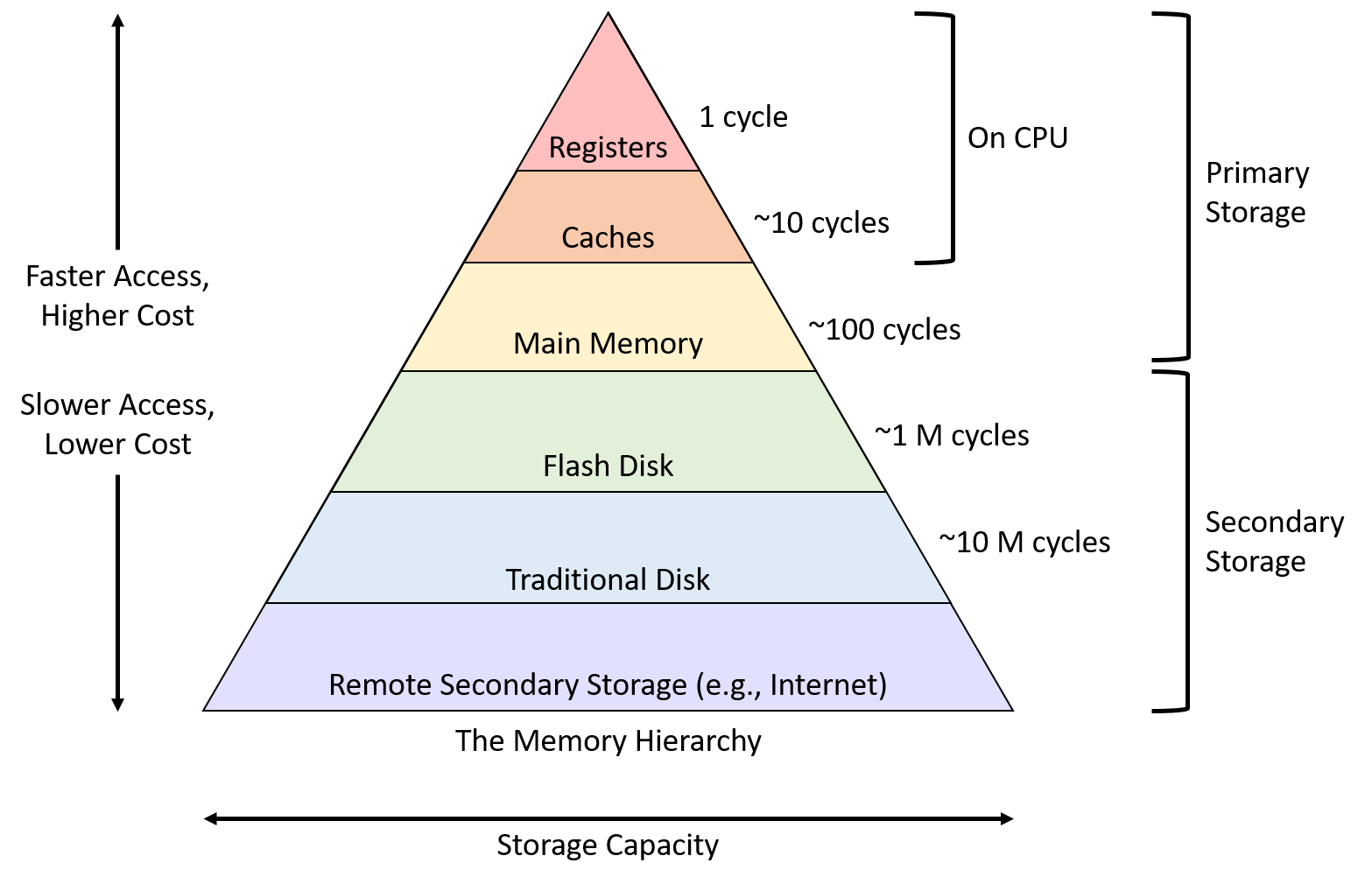
Generally the two things we want to balance when it comes to memory are complexity and performance. Systems can use devices that are fast or devices that store a large amount of data but there is yet to exist an economically feasible device that does both.
Faster devices tend to get expensive very quickly. On the CPU level, caches can give us a good boost in performance, but building a CPU with a large enough cache to forego main memory makes the design infeasible.
It is almost a requirement to understand said memory hierarchy when writing performance-driven software.
The general classification of devices in the hierarchy above depends on how programs access their data. Primary storage devices can be touched directly by the CPU. This is where all of our assembly instructions encode the exact location of the data. Common examples include registers and RAM/main memory.
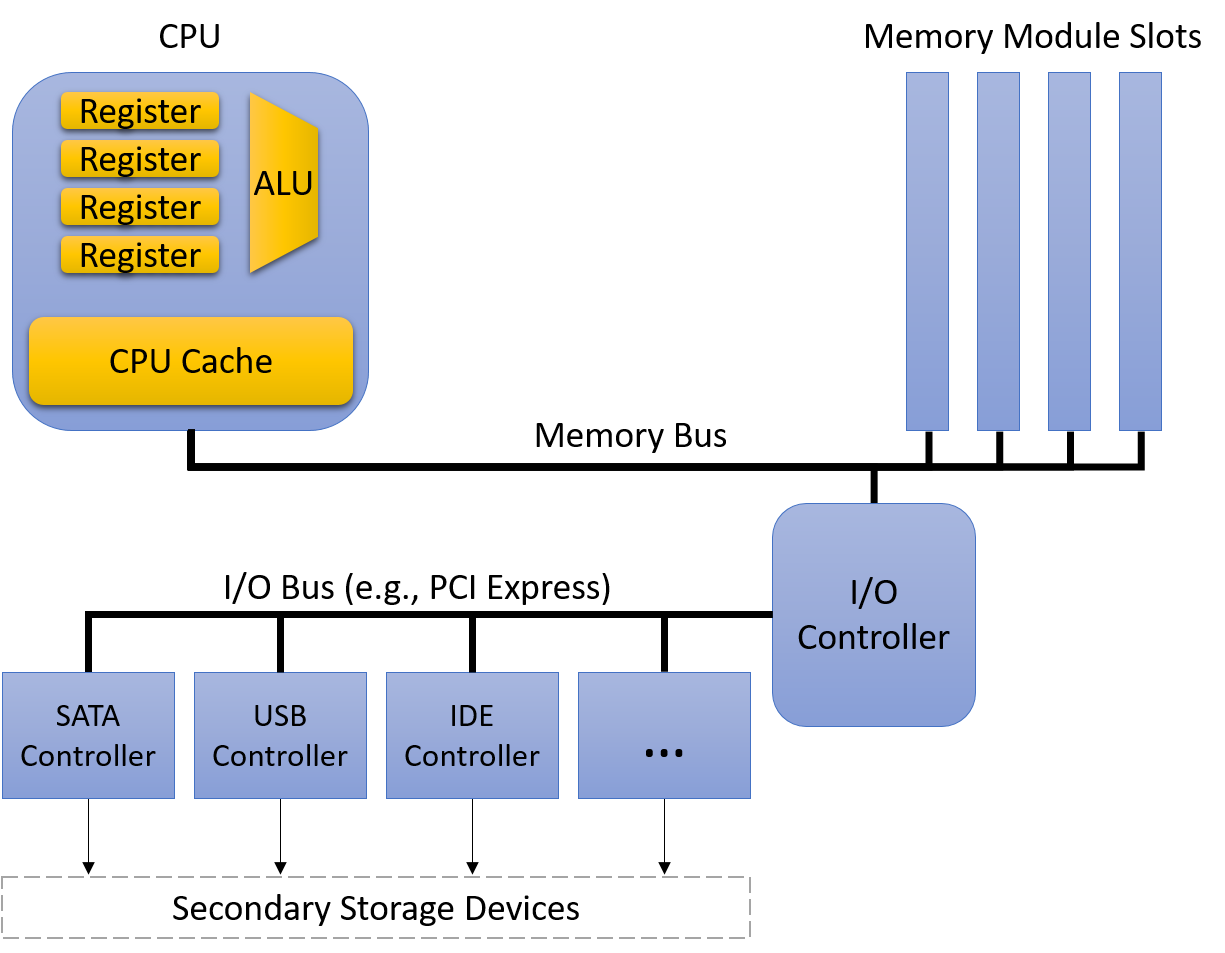
Secondary storage cannot be directly accessed by the CPU instructions; one must first ask the device itself to copy its content to the primary storage which is typically RAM. eMMCs are a good example of this!
This distinction is very interesting at a fundamental level; when we declare and assign ordinary variables we are just playing on the primary storage which is why we can directly start using that data for arithmetic operations on the Arithmetic logic unit. However, when we work with input file data, we will have to parse it and read it into memory variables before we can do anything with it. This is a very common pattern in writing software but useful to contemplate it for a second :)
There are few other things to keep in mind here:
- Capacity: How many bytes we can store
- Latency: Amount of time it takes for the device to respond with data after we ask for it. Measuring this in CPU cycles is useful but we can also measure as a fraction of a second.
- Transfer rate: This is also known as the throughput which is the amount of data that we can move between secondary and primary memory over some defined interval of time. This is typically measured in bytes per second.
The performance across capacity, latency, and throughput happens due to distance (physically on the chip) or the physics restraining the technologies used to implement said device.
CPU designers place registers close to the ALU to minimize the time it takes for a signal to propagate between the two when computing something. This explains why registers can be extremely performant for example. Although they are fast, that comes at the cost of them being only able to store few bytes as well as the fact that we can only afford to put a small number of them around. Secondary devices are connected by longer wires and that extra distance and intermediate processing slows things down!
Admiral Grace Hopper frequently handed out 11.8-inch strands of wire to audience members. These represented the maximum distance that an electric signal travels in one nanosecond. She used them to describe the latency limitations of satellite communication and to demonstrate why computing devices need to be small in order to be fast.
Link: https://www.youtube.com/watch?v=9eyFDBPk4Yw
As to the underlying technology aspect, registers and caches are built from relatively simple circuits which only have few logic gates. The small size and minimal complexity ensures a quick propagation of the electrical signals which also reduces latency. Traditional hard disks contain a spinning magnetic platters that store hundreds of gigabytes which means that the latency is high due to the mechanical work that must be done to align the rotating components into the correct position to access the desired sequence of data.
Primary Storage
Most of what we call today as primary storage is just RAM (Random Access Memory). This devices stores data like a map and it doesn't need to worry about the position and location of said data. There are to common and widely used types of RAM:
- SRAM (Static RAM)
- DRAM (Dynamic RAM)
Let's compare them given the few metrics that we discussed:
| Device | Capacity | Latency | Type |
|---|---|---|---|
| Register | 4-8 bytes | < 1 ns | SRAM |
| CPU cache | 1-32 MB | 5 ns | SRAM |
| Main memory | 4-64 GB | 100 ns | DRAM |
SRAM stores data in small circuits (Latches for example); these are typically the fastest type of memory, and are often integrated directly into the CPU. SRAM devices are pretty expensive to build, expensive to operate due to the high power consumption, and occupies a lot of space.
DRAM stores data using capacitors; we call them dynamicbecause they frequently refresh the charge of the capacitors to maintain a stored value. Modern systems implement main memory with these which connect to the CPU via high-speed interconnect known as memory bus.
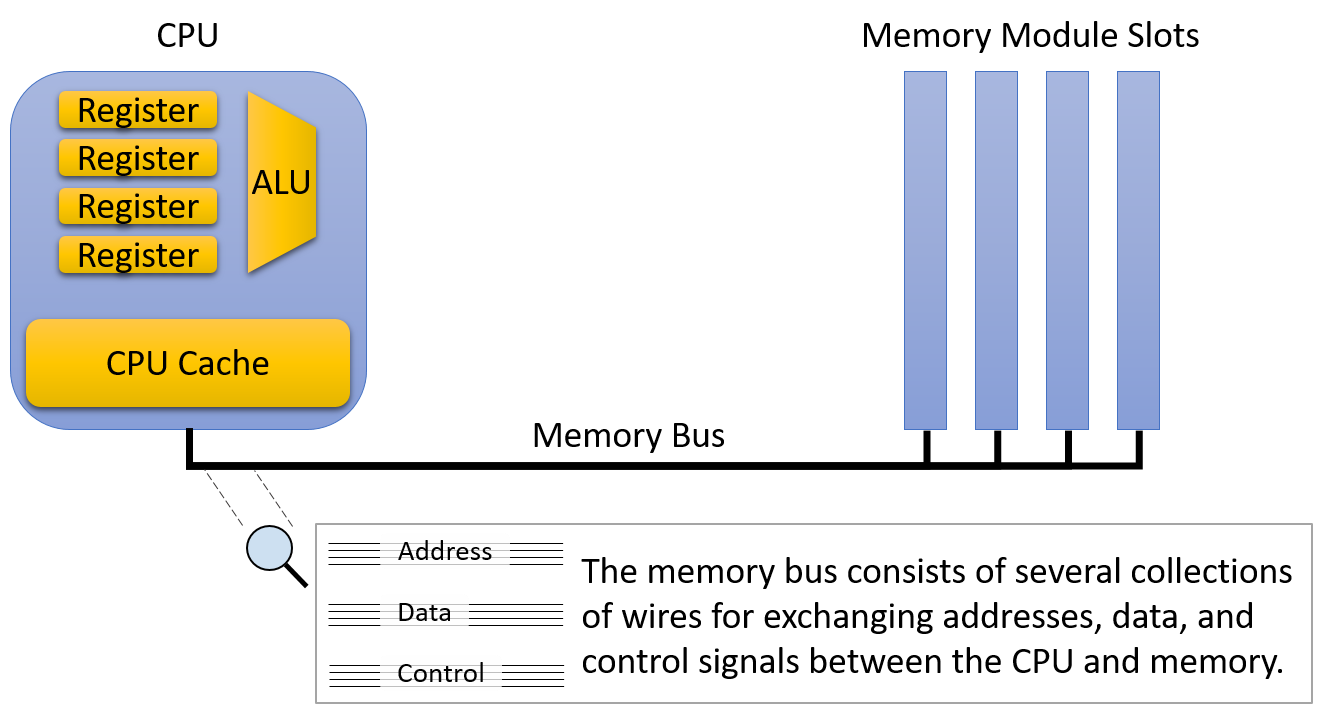
The memory bus is sometimes referred to as the von Neumann bottleneck since the extra distance it adds will inevitably increase latency and reduce throughput.
CPU cache represents a middle ground between registers and main memory (physically and in terms of capabilities and capacity). The cool thing about cache is that it's mostly managed by some control circuitry on the CPU itself; the CPU will put a section of the main memory in cache to make it easier to do operations later on and thus give us a performance boost.
We can have multiple levels of caches (representing an internal memory hierarchy); one can have a small and fast L1 cache which stores a subset of a slightly larger and slower L2 cache which stores a subset of the less cool L3 cache.
Let's do some inspection here on the side:
❯ lscpu
Architecture:                x86_64
  CPU op-mode(s):            32-bit, 64-bit
  Address sizes:             48 bits physical, 48 bits virtual
  Byte Order:                Little Endian
CPU(s):                      16
  On-line CPU(s) list:       0-15
Vendor ID:                   AuthenticAMD
  Model name:                AMD Ryzen 7 7800X3D 8-Core Processor
    CPU family:              25
    Model:                   97
    Thread(s) per core:      2
    Core(s) per socket:      8
    Socket(s):               1
    Stepping:                2
    Frequency boost:         enabled
    CPU(s) scaling MHz:      79%
    CPU max MHz:             5053.3770
    CPU min MHz:             426.1890
    BogoMIPS:                8383.80
    Flags:                   fpu vme de pse tsc msr pae mce cx8 apic sep mtrr pge mca cmov pat pse36 clflush mmx fxsr sse sse2 ht syscall nx mmxext fxsr_opt pdpe1gb rdtscp lm constant_tsc rep_good amd_lbr_v2 nopl xtopology nonstop_tsc cpuid extd_apicid aperfmperf rapl pni pclmulqd
                             q monitor ssse3 fma cx16 sse4_1 sse4_2 movbe popcnt aes xsave avx f16c rdrand lahf_lm cmp_legacy svm extapic cr8_legacy abm sse4a misalignsse 3dnowprefetch osvw ibs skinit wdt tce topoext perfctr_core perfctr_nb bpext perfctr_llc mwaitx cpuid_fault cpb
                              cat_l3 cdp_l3 hw_pstate ssbd mba perfmon_v2 ibrs ibpb stibp ibrs_enhanced vmmcall fsgsbase bmi1 avx2 smep bmi2 erms invpcid cqm rdt_a avx512f avx512dq rdseed adx smap avx512ifma clflushopt clwb avx512cd sha_ni avx512bw avx512vl xsaveopt xsavec xgetbv1
                              xsaves cqm_llc cqm_occup_llc cqm_mbm_total cqm_mbm_local user_shstk avx512_bf16 clzero irperf xsaveerptr rdpru wbnoinvd cppc arat npt lbrv svm_lock nrip_save tsc_scale vmcb_clean flushbyasid decodeassists pausefilter pfthreshold avic vgif x2avic v_spe
                             c_ctrl vnmi avx512vbmi umip pku ospke avx512_vbmi2 gfni vaes vpclmulqdq avx512_vnni avx512_bitalg avx512_vpopcntdq rdpid overflow_recov succor smca fsrm flush_l1d amd_lbr_pmc_freeze
Virtualization features:
  Virtualization:            AMD-V
Caches (sum of all):
  L1d:                       256 KiB (8 instances)
  L1i:                       256 KiB (8 instances)
  L2:                        8 MiB (8 instances)
  L3:                        96 MiB (1 instance)
NUMA:
  NUMA node(s):              1
  NUMA node0 CPU(s):         0-15
Vulnerabilities:
  Gather data sampling:      Not affected
  Ghostwrite:                Not affected
  Indirect target selection: Not affected
  Itlb multihit:             Not affected
  L1tf:                      Not affected
  Mds:                       Not affected
  Meltdown:                  Not affected
  Mmio stale data:           Not affected
  Old microcode:             Not affected
  Reg file data sampling:    Not affected
  Retbleed:                  Not affected
  Spec rstack overflow:      Mitigation; Safe RET
  Spec store bypass:         Mitigation; Speculative Store Bypass disabled via prctl
  Spectre v1:                Mitigation; usercopy/swapgs barriers and __user pointer sanitization
  Spectre v2:                Mitigation; Enhanced / Automatic IBRS; IBPB conditional; STIBP always-on; PBRSB-eIBRS Not affected; BHI Not affected
  Srbds:                     Not affected
  Tsa:                       Mitigation; Clear CPU buffers
  Tsx async abort:           Not affected
  Vmscape:                   Mitigation; IBPB before exit to userspace
We can see with lscpu the size of each cache on our system! (free -m could be used to inspect memory).
Secondary Storage
Ignoring Punched card recording, one of the oldest secondary devices was the Tape drive; tape drives store information on a magnetic tape which offers much higher storage density than your primary memory devices!
Removable media like floppy disks and optical discs were also common at the start of the century.
modern secondary storage devices are quite different though:
| Device | Capacity | Latency | Throughput |
|---|---|---|---|
| Flash disk | 0.5 - 2 TB | 0.1-1 ms | 200-3000 MB/s |
| Hard disk | 0.5 - 10 TB | 5-10 ms | 100-200 MB/s |
| Remote Network Server | Varies a lot.. | 20-200 ms | Varies a lot.. |
The most common devices today are hard disk drives (HDDs) and flash-based solid-state drives (SSDs). A hard disk consists of a few flat, circular platters made from material that allows for magnetic recording. These roate quickly at really high speeds (can reach 15k rev/min). As we spin, a small mechanical arm moves across and reads/writes data on the concentric tracks (regions on the platter located at the same diameter).
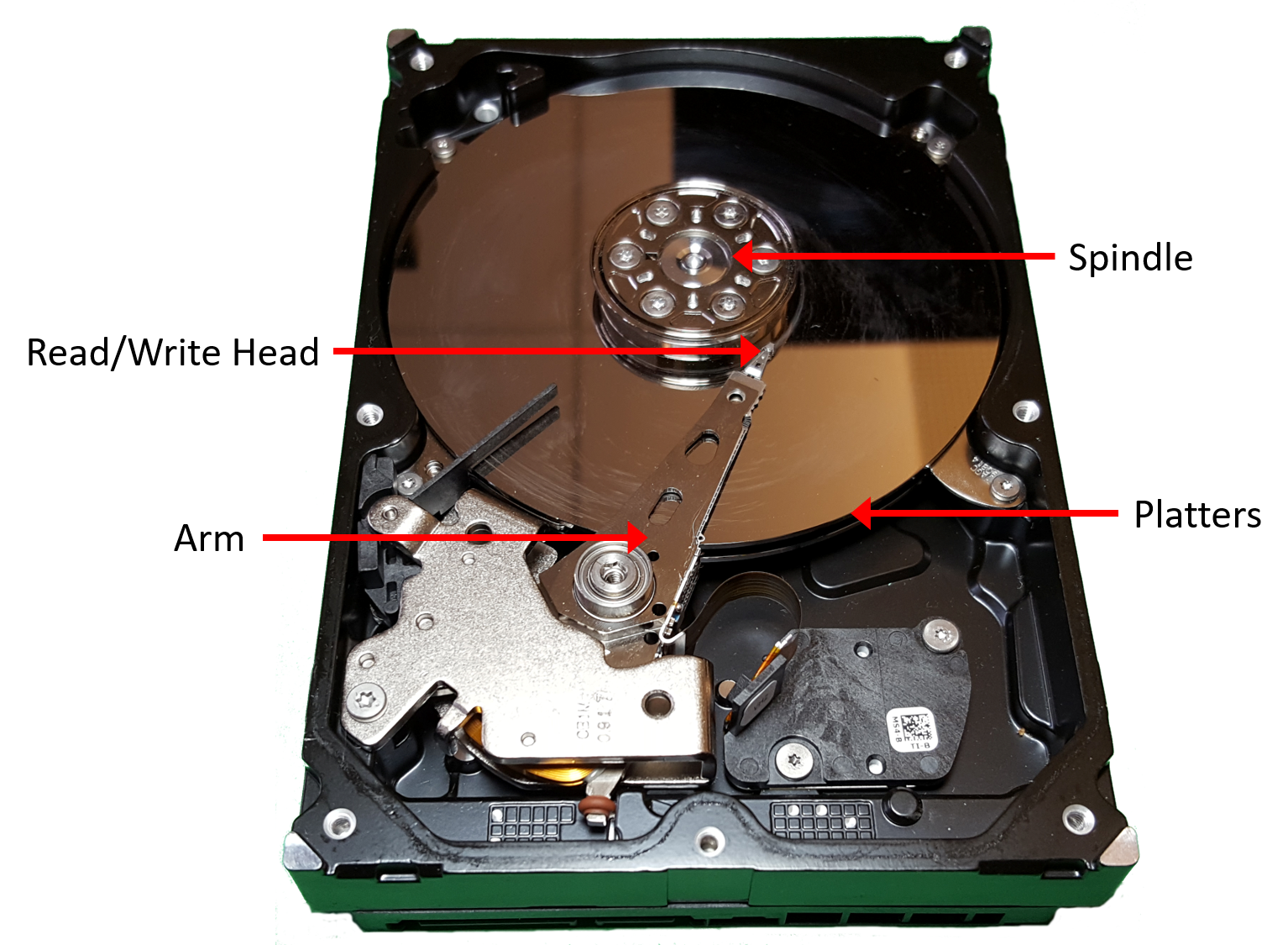
Before accessing data, the disk must align the disk head with the track that contains the data we want. The alignment involves extending or retracting the arm until the head sits above the track. Moving the disk arm is known as seeking, and the time it takes for this mechanical operation to happen is known by seek time delay; this delay can be few milliseconds. When the arm is above the correct track, the disk head will wait for the platter to rotate until the disk head is above the exact location where the data is stored. This introduces another short delay known as rotational latency.
SSDs on the other hand have no mechanical part :)
Will make a separate note about those later.
References
Flash memory
Floppy disk
Solid-state drive
Hard disk drive
Random-access memory